

Table of contents
If you run a business in Kenya, you already know that M-Pesa is not just a payment method. It is the way a huge number of customers pay for almost everything: groceries, school fees, rent, airtime, fuel, bills, bookings and online orders. So when you build or upgrade a business website, one question comes up quickly: how do we let customers pay with M-Pesa directly on the site?
Without integration, the process is clumsy. The customer sees a Paybill number on your website, leaves the page, opens the M-Pesa menu, types the number, the account and the amount, waits for the confirmation SMS, then sends you a screenshot or calls to confirm. You, meanwhile, scroll through messages trying to match payments to orders. Mistakes happen, sales are lost and customers get frustrated.
With proper integration, the experience is smooth. The customer clicks “Pay with M-Pesa,” a prompt appears on their phone, they enter their PIN and your website instantly knows that the payment succeeded. The order is confirmed, a receipt is sent and your records update automatically.
This guide explains how M-Pesa integration works, what you need, the main integration options, a step-by-step process for using Safaricom’s Daraja API, the common mistakes to avoid and how to decide between building it yourself, using a plugin, using an aggregator or hiring a developer. It is written for business owners and managers, with enough technical detail to help you talk confidently with a developer, and a sample code outline for those who want to see how the pieces fit.
What "M-Pesa integration" actually means
M-Pesa integration means connecting your website, app or system to M-Pesa so that payment requests can be triggered and payment confirmations can be received automatically. Safaricom provides this capability through Daraja, its developer platform and API suite. Daraja opened M-Pesa to developers and businesses so they could link their software directly to the mobile money service.
Through Daraja, a website can:
- Request payments from customers by sending a prompt to their phone (STK Push, also known as M-Pesa Express or Lipa na M-Pesa Online).
- Receive notifications when customers pay to your Paybill or Till number (C2B, customer to business).
- Send money to customers such as refunds, salaries, winnings or commissions (B2C, business to customer).
- Pay other businesses (B2B).
- Check transaction status, query account balance and reverse transactions in certain situations.
For most business websites, STK Push is the key feature, because it creates the smoothest checkout experience. C2B confirmation is also valuable if customers pay by Paybill or Till and you want automatic matching. B2C is useful for refunds, payouts and disbursements.
Why integrate M-Pesa into your website?
The benefits are practical and measurable.
Higher conversion. The fewer steps between “I want this” and “paid,” the more sales you complete. STK Push removes the need to leave the page, remember numbers or type account details.
Instant confirmation. Your website knows immediately if a payment succeeded or failed, so orders can be confirmed, tickets issued or services activated without manual checking.
Fewer errors. Typing a Paybill number and account reference by hand invites mistakes. Automatic prompts and references reduce failed or misallocated payments.
Less admin. Staff no longer need to scroll through SMS messages or statements to match payments with orders.
Better customer experience. A seamless mobile checkout builds trust and encourages repeat purchases.
Cleaner records. Each transaction is logged with details that your accountant can reconcile, and reports can be generated automatically.
Wider reach. Customers across the country can pay without visiting you or trusting an informal arrangement.
If you are still deciding what an online presence should include more generally, our article on why your business needs a professional website explains how payments fit into the wider picture.
What you need before you start
Before any code is written, make sure you have the basics in place.
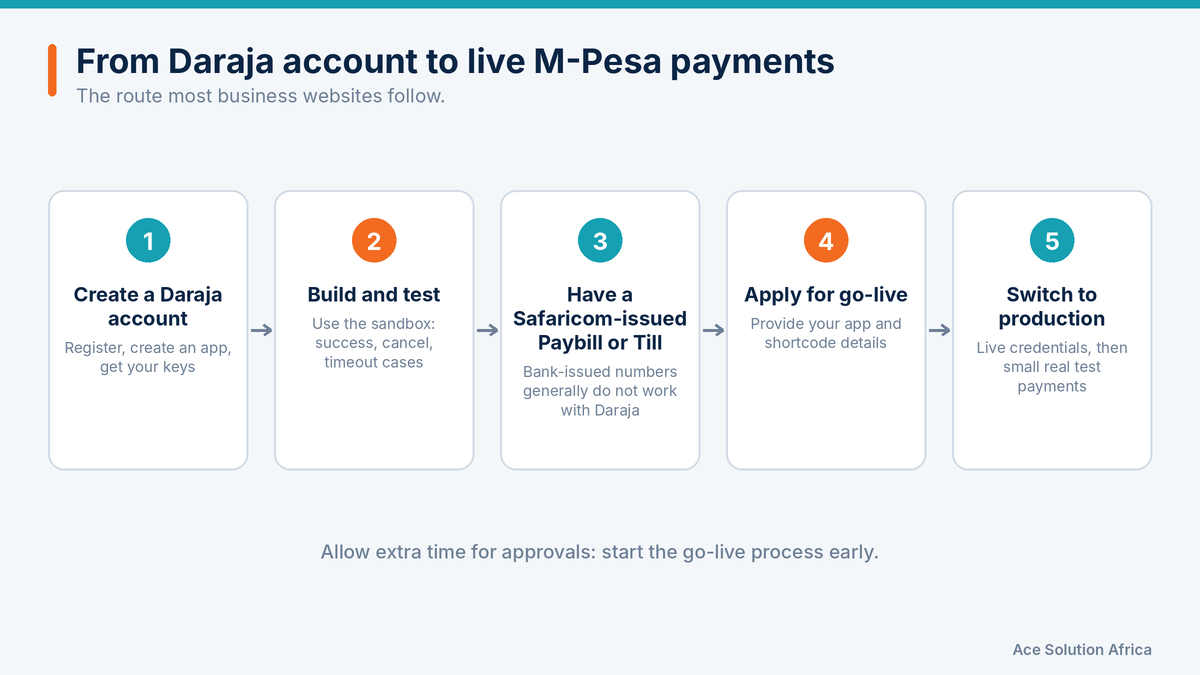
1. A Safaricom-issued Paybill or Till number
For production integration through Daraja, you need a Paybill (Lipa na M-Pesa Paybill) or Till (Buy Goods) number issued by Safaricom for your business. A critical detail that many people discover late: shortcodes issued by banks for their own bank-linked Paybills generally cannot be used directly with Daraja for your integration. If you do not yet have an appropriate Safaricom-issued number, you will need to apply for one through Safaricom’s channels, which usually requires your business registration documents and identification. Requirements and processes can change, so confirm the current steps with Safaricom or with your integration partner.
Paybill vs Till: which should you choose?
- Paybill is common for businesses that need an account reference, such as schools, landlords, utilities and service providers. The customer enters the account number so you can identify who paid.
- Till (Buy Goods) is typical for retail and merchants. Customers pay to the till number without an account reference.
For websites, STK Push can attach an account reference or description automatically, so either option can work. Your accountant and business model should guide the choice, including considerations about transaction charges and settlement.
2. A Safaricom Daraja developer account
Registering on the Daraja portal is free. You create an account, then create an “app” on the portal, selecting the products you want, such as M-Pesa Express (STK Push) and the sandbox environment. The portal then provides a Consumer Key and Consumer Secret for your app. Daraja is free to sign up for and use, although standard M-Pesa transaction charges apply to payments you collect.
3. A website or system capable of server-side code
M-Pesa integration cannot be done with plain HTML alone. Calls to Daraja must be made from your server, not from the visitor’s browser, because they involve secret credentials that must never be exposed publicly. Your website needs a backend, such as PHP (including WordPress and WooCommerce), Node.js, Python (Django or Flask), Laravel or similar.
4. A secure HTTPS website and public callback URL
Daraja sends payment results to a callback URL on your server. This URL must be publicly accessible over HTTPS. If your site is not yet on a live domain with SSL, you cannot receive real callbacks. During development, developers often use tunnelling tools to expose a local server temporarily for testing.
5. Business processes
Decide how orders and payments should be linked, what happens if a customer cancels or the payment times out, how refunds will be handled, who monitors failed transactions and how reconciliation will be done.
The main ways to integrate M-Pesa
There is no single correct method. The best option depends on your platform, budget, technical resources and volume.
Option 1: Direct integration with the Daraja API
You build the integration yourself or hire a developer to connect your site directly to Safaricom.
Pros: Full control, no aggregator fees, flexible customisation, direct relationship with Safaricom, and the ability to build tailored reconciliation and reporting. Cons: More technical work, you manage credentials, testing and security, and you must go through Safaricom’s go-live process. Best for: Businesses with developers or an agency, stores with higher volume, and custom systems.
Option 2: A ready-made plugin (WooCommerce and others)
If your site runs on WordPress with WooCommerce, there are plugins that add M-Pesa as a payment method. Many use Daraja behind the scenes and require you to enter your credentials in the settings.
Pros: Fast setup, lower cost, no coding for basic use. Cons: Quality varies. Some plugins are poorly maintained or insecure. Customisation and reconciliation features may be limited. Best for: Small and medium WooCommerce stores. Always choose actively maintained plugins with good reviews, and have a developer configure and test them.
Option 3: A payment aggregator or gateway
Several payment providers offer a single integration that supports M-Pesa, cards and other methods. Examples include Pesapal, Flutterwave, IntaSend and similar services, among others. They manage much of the Safaricom connection and compliance for you.
Pros: Faster launch, multiple payment methods under one integration, helpful dashboards and support. Cons: Transaction fees, dependence on a third party, and possibly slower settlement or different reconciliation processes. Best for: Businesses that want multiple payment options quickly and are comfortable paying fees for convenience.
Option 4: Custom development by an agency
For complex systems, such as marketplaces, school fee platforms, subscription services or fintech products, a custom integration handles multiple flows: STK Push, C2B confirmation, B2C payouts, reversals, wallet logic and detailed reporting.
Pros: Tailored to your business rules and scalable. Cons: Higher cost and longer timeline. Best for: Businesses where payments are central to the product.
If you are weighing these choices alongside your overall website approach, see our comparison of WordPress and custom website development in Kenya.
Need M-Pesa on your website?
We can recommend and build the right method for you, direct Daraja, a plugin or an aggregator, and test it before launch.
How STK Push works, in plain language
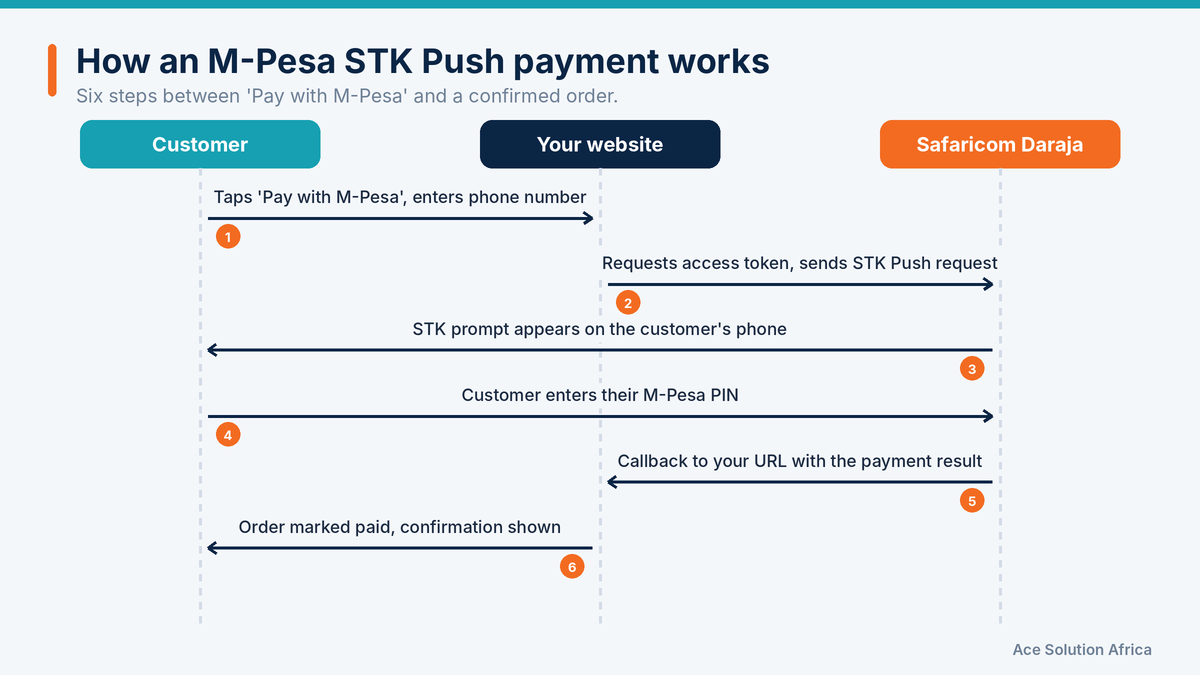
STK Push is the heart of most website integrations, so it is worth understanding the flow.
- Customer decides to pay. On your website, they choose M-Pesa and enter their phone number.
- Your server asks Safaricom for permission. It requests an access token from Daraja using your Consumer Key and Secret.
- Your server sends the payment request. Using the token, your server sends a request to the STK Push endpoint, with the amount, phone number, your shortcode, a callback URL and a reference.
- Safaricom prompts the customer. A pop-up appears on the customer’s phone asking them to enter their M-Pesa PIN.
- Customer confirms or cancels. They enter the PIN, or cancel, or let it time out.
- Safaricom processes the payment. If successful, money moves from the customer’s M-Pesa account to your shortcode.
- Safaricom notifies your server. It sends a callback to your URL with the result, including a result code, a description and, for successful payments, details such as the M-Pesa receipt number, amount and phone number.
- Your website updates the order. If the payment succeeded, you mark the order as paid and trigger confirmation emails, SMS, tickets or delivery processes. If it failed, you inform the customer and offer to retry.
- Customer sees the result. Your site shows a success or failure message, typically after checking or polling the order status.
The customer experience feels instant, though behind the scenes there are several handshakes.
Step-by-step: integrating M-Pesa Express (STK Push) with Daraja
Here is a practical outline. Your developer will adapt details to your platform and the current Daraja documentation, which you should always treat as the authoritative source because details and endpoints can be updated.
Step 1: Create a Daraja account and an app
Register on the Daraja portal, create a new app, and tick the products you need. For STK Push, select the M-Pesa Express (Lipa na M-Pesa Online) and sandbox options. Copy your Consumer Key and Consumer Secret and store them securely, for example in environment variables rather than inside public code.
Step 2: Understand the sandbox
The sandbox is a safe testing environment where no real money moves. Safaricom publishes test values for it, including a test shortcode and passkey. Developers commonly use these sample values to build and test the flow before going live. Sandbox behaviour can differ slightly from production, so do not assume that everything will behave identically when live.
Step 3: Get an access token
Your server requests an OAuth access token from Daraja by sending your Consumer Key and Consumer Secret using HTTP Basic authentication to the token endpoint. The response includes an access token and an expiry time. Tokens expire after a short period, so your code should request a fresh token when needed rather than hard-coding one.
The base URLs differ between sandbox and production, and your code should switch between them using configuration, not by editing code.
Step 4: Generate the password and timestamp
Each STK Push request requires a timestamp in a specified format (year, month, day, hour, minute and second) and a password. The password is created by joining your business shortcode, your passkey and the timestamp, then encoding the result in Base64. Production credentials, including the passkey, are issued to you when your integration is approved for go-live.
Step 5: Send the STK Push request
Your server sends a POST request to the M-Pesa Express endpoint with a JSON body including fields such as:
- BusinessShortCode: your Paybill or Till shortcode.
- Password: the Base64 password described above.
- Timestamp: the timestamp used to create the password.
- TransactionType: commonly “CustomerPayBillOnline” for Paybill or “CustomerBuyGoodsOnline” for Till.
- Amount: the amount to charge.
- PartyA: the customer’s phone number in international format, such as 2547XXXXXXXX.
- PartyB: the shortcode that receives the funds.
- PhoneNumber: the phone to prompt, in the same international format.
- CallBackURL: your public HTTPS endpoint for results.
- AccountReference: a reference such as an order number or account ID.
- TransactionDesc: a short description of the transaction.
Daraja responds immediately with an acknowledgment that includes identifiers such as the MerchantRequestID and CheckoutRequestID. This only means that the request was accepted, not that the customer has paid. Store these IDs against the order so you can match the later callback.
Step 6: Handle the callback
When the customer completes, cancels or times out, Safaricom sends a POST request to your callback URL. Your endpoint should:
- Accept and log the raw JSON safely.
- Read the result code, where zero typically indicates success and other values indicate different failure reasons.
- Match the CheckoutRequestID to the correct order in your database.
- For successful payments, record the M-Pesa receipt number, amount, transaction date and phone number.
- Update the order status accordingly.
- Respond quickly with an acknowledgment so Safaricom knows you received it.
- Avoid processing the same callback twice (idempotency), since duplicate notifications can occur.
Step 7: Provide status feedback to the customer
Customers need to know what is happening. After sending the prompt, show a message such as “Check your phone and enter your M-Pesa PIN.” Your frontend can poll your server for the order status every few seconds, or use real-time updates, then display success or an error message with an option to retry. You can also use Daraja’s transaction status query for STK Push to check results if a callback does not arrive.
Step 8: Add reconciliation and reporting
Record every attempt, success and failure. Create an admin view that lists transactions, filters by date and status, and exports data for your accountant. For businesses with higher volume, consider automatic reconciliation against M-Pesa statements and alerts for mismatches.
Step 9: Test thoroughly in the sandbox
Test the following scenarios before going live:
- Successful payment
- Customer cancels the prompt
- Customer enters the wrong PIN or has insufficient funds
- Prompt times out with no response
- Invalid phone number format
- Duplicate callbacks
- Callback arrives late or never arrives
- Customer closes the browser mid-payment
- Amount changes or order edits after initiation
A robust integration deals gracefully with all of these.
Step 10: Apply for production and go live
When your integration works in the sandbox, you apply for production access (go-live) through the Daraja portal, providing the details of your app and Paybill or Till number. Safaricom reviews and issues production credentials, including the passkey that corresponds to your shortcode. You then switch your configuration to production endpoints and credentials, test with small real transactions and monitor closely.
Approval timelines vary, so start the go-live process early. Have your business documentation and shortcode details ready, and make sure your callback URL is live and secure.
A simplified code outline
The example below is a simplified PHP illustration of the idea, to help you understand how the parts fit together. It is not production-ready code, and your developer should add proper validation, error handling, logging, security and configuration management. Always refer to Safaricom’s current Daraja documentation for exact endpoints and parameters.
<?php
// 1. Configuration (store real values in environment variables, never in public code)
$consumerKey    = getenv('MPESA_CONSUMER_KEY');
$consumerSecret = getenv('MPESA_CONSUMER_SECRET');
$shortcode      = getenv('MPESA_SHORTCODE');
$passkey        = getenv('MPESA_PASSKEY');
$baseUrl        = getenv('MPESA_BASE_URL'); // sandbox or production
$callbackUrl    = 'https://www.yourdomain.co.ke/mpesa/callback.php';

// 2. Get an access token
function getAccessToken($baseUrl, $key, $secret) {
    $ch = curl_init($baseUrl . '/oauth/v1/generate?grant_type=client_credentials');
    curl_setopt($ch, CURLOPT_USERPWD, $key . ':' . $secret);
    curl_setopt($ch, CURLOPT_RETURNTRANSFER, true);
    $response = json_decode(curl_exec($ch), true);
    curl_close($ch);
    return $response['access_token'] ?? null;
}

// 3. Send an STK Push request
function stkPush($baseUrl, $token, $shortcode, $passkey, $phone, $amount, $orderRef, $callbackUrl) {
    $timestamp = date('YmdHis');
    $password  = base64_encode($shortcode . $passkey . $timestamp);

    $payload = [
        'BusinessShortCode' => $shortcode,
        'Password'          => $password,
        'Timestamp'         => $timestamp,
        'TransactionType'   => 'CustomerPayBillOnline',
        'Amount'            => $amount,
        'PartyA'            => $phone,        // e.g. 2547XXXXXXXX
        'PartyB'            => $shortcode,
        'PhoneNumber'       => $phone,
        'CallBackURL'       => $callbackUrl,
        'AccountReference'  => $orderRef,
        'TransactionDesc'   => 'Payment for order ' . $orderRef,
    ];

    $ch = curl_init($baseUrl . '/mpesa/stkpush/v1/processrequest');
    curl_setopt($ch, CURLOPT_HTTPHEADER, [
        'Authorization: Bearer ' . $token,
        'Content-Type: application/json',
    ]);
    curl_setopt($ch, CURLOPT_POST, true);
    curl_setopt($ch, CURLOPT_POSTFIELDS, json_encode($payload));
    curl_setopt($ch, CURLOPT_RETURNTRANSFER, true);
    $response = json_decode(curl_exec($ch), true);
    curl_close($ch);
    return $response; // contains MerchantRequestID and CheckoutRequestID
}
And a simplified callback receiver:
<?php
// callback.php: receives the result from Safaricom
$raw  = file_get_contents('php://input');
$data = json_decode($raw, true);

$callback   = $data['Body']['stkCallback'] ?? [];
$resultCode = $callback['ResultCode'] ?? null;
$checkoutId = $callback['CheckoutRequestID'] ?? null;

if ($resultCode === 0) {
    // Payment succeeded: read the receipt number, amount and phone from CallbackMetadata,
    // find the order by $checkoutId, and mark it as paid (once only).
} else {
    // Payment failed or was cancelled: update the order status and allow retry.
}

// Acknowledge receipt to Safaricom
header('Content-Type: application/json');
echo json_encode(['ResultCode' => 0, 'ResultDesc' => 'Accepted']);
Note how the secret credentials stay on the server, the callback is a separate endpoint and the order is matched using an ID created at the start of the transaction.
Integrating M-Pesa on WordPress and WooCommerce
For many Kenyan businesses, the practical route is WordPress with WooCommerce and an M-Pesa plugin. A sensible process looks like this:
- Choose a reputable plugin. Check the last update date, support responsiveness, reviews and compatibility with your versions of WordPress and WooCommerce.
- Install and configure it. Enter your shortcode, Consumer Key, Consumer Secret, passkey and callback settings in the plugin’s settings page.
- Test in the sandbox first. Many plugins have a sandbox mode. Place test orders and confirm that statuses change correctly.
- Check order status handling. Make sure paid orders move to “processing” or “completed” and failed payments are handled gracefully.
- Test on real phones. Use different networks and handsets.
- Go live with small test transactions. Run a few small real payments and confirm they appear properly in your records.
- Monitor. Watch for failures, delayed callbacks and abandoned payments.
Be aware that plugins are third-party code. Keep them updated, avoid pirated versions, restrict admin access and back up your site regularly.
Using Paybill or Till confirmation (C2B)
Not every customer will use STK Push. Some will still pay manually to your Paybill or Till number, for example when they are in a shop or when they prefer to enter details themselves. C2B integration lets your system receive automatic notifications of these payments through registered validation and confirmation URLs.
With C2B, you can:
- Match payments to invoices using the account number.
- Mark invoices as paid automatically.
- Handle top-ups, school fees, rent, subscriptions or utility payments.
- Reduce manual statement checking.
For businesses that receive many manual payments, C2B confirmation plus STK Push provides coverage for both customer behaviours.
Paying customers: B2C and refunds
If your business needs to send money, such as refunds, commissions, salaries, winnings or supplier payments, the B2C API lets you disburse funds from your business account to customer phones. This requires additional approvals, secure credential handling, strong access controls and careful logging, because money is leaving your account. Many businesses start with STK Push collections and add B2C later when they have a clear need and strong controls in place.
Security best practices
Payments demand extra care. Follow these principles.
- Keep secrets on the server. Never expose your Consumer Secret, passkey or tokens in browser code or public repositories.
- Use HTTPS everywhere. Both your site and callback endpoints should be encrypted.
- Validate callbacks. Confirm that the CheckoutRequestID matches a pending transaction you created, and verify amounts against the order before marking it as paid.
- Prevent duplicates. Ensure a callback cannot mark the same order as paid twice or trigger duplicate deliveries.
- Restrict access. Limit who can view transaction data and change payment settings, and use strong passwords and two-factor authentication.
- Log carefully. Keep detailed logs for troubleshooting, but do not log secrets.
- Rate-limit and protect forms. Prevent abuse, such as attackers spamming STK prompts to random phone numbers.
- Keep software updated. Update WordPress, plugins, frameworks and server software promptly.
- Back up and monitor. Regular backups and uptime monitoring help you recover quickly from problems.
- Respect data protection laws. You will handle personal data such as phone numbers and transaction details. Collect only what you need, protect it, publish a clear privacy policy and follow applicable requirements under Kenya’s Data Protection Act. Take legal advice on your specific obligations.
Want payments handled securely and reliably?
Protected credentials, validated callbacks and reconciliation built in from day one.
Common problems and how to fix them
The STK prompt does not appear on the phone. Check the phone number format (it should be in international format starting with 254), that the number is registered for M-Pesa, that you are using the correct shortcode and credentials for the environment, and that there is no network or SIM issue. In the sandbox, remember that test behaviour differs from production.
The callback is never received. Make sure the callback URL is public, uses HTTPS, has no blocking security rules, and returns a valid response quickly. Firewalls, redirects and incorrect paths are common culprits. Use the transaction status query as a fallback.
Authentication errors. Confirm that your Consumer Key and Secret are correct, that you are using the right base URL for the environment and that your token has not expired.
Wrong password or timestamp errors. Check the order of the concatenated values, the timestamp format and that the passkey matches the shortcode and environment.
Duplicate or missing orders. Implement idempotent callback handling and store transaction identifiers from the start.
Customers pay but the order stays pending. This often happens when the callback fails or the customer closes the page. Build a reconciliation job that checks pending transactions and updates them using the status API.
Amount mismatch. Always compare the paid amount against the order total on your server rather than trusting client-side values.
Production approval delays. Prepare documents early, ensure your shortcode and callback URL are ready and follow up politely with Safaricom support if needed.
What does M-Pesa integration cost?
Costs vary with approach and complexity.
- Daraja itself: Free to register and use. Standard M-Pesa transaction charges apply to payments.
- Plugins: May be free or paid, sometimes with annual licences. Setup and testing by a developer are additional.
- Aggregators: Usually charge a percentage or fixed fee per transaction, and sometimes setup or monthly fees.
- Developer or agency fees: A basic STK Push integration is often priced in the range of tens of thousands of shillings, while advanced integrations with C2B, B2C, reconciliation and dashboards cost more, depending on scope.
- Maintenance: Ongoing updates, monitoring and support, particularly if Safaricom updates APIs or credentials need renewal.
For a broader view of costs when selling online, see our guide to ecommerce website development costs in Kenya.
Questions to ask your developer or agency
When you hire someone to integrate M-Pesa, ask:
- Have you integrated Daraja before? Can you show examples or references?
- Will you integrate directly with Daraja, use a plugin or use an aggregator, and why?
- Does the price include sandbox testing, go-live support and training?
- How will you handle callbacks, failed payments, timeouts and duplicates?
- How will payments be reconciled with orders and accounting records?
- How will you protect credentials and customer data?
- What happens if Safaricom changes an API or my credentials need renewal?
- Who owns the code and the Daraja app credentials?
- What ongoing support and maintenance do you offer?
- How long will the integration take, including the go-live approval process?
Experienced providers answer clearly and can explain trade-offs. If you would like a team that builds and supports payment-enabled websites for Kenyan businesses, you can learn more about our website design and development in Kenya and discuss your payment needs with us.
Planning your integration: a checklist
Use this checklist to make sure nothing is missed.
- ☐ Safaricom-issued Paybill or Till number confirmed
- ☐ Daraja developer account created and app configured
- ☐ Hosting with HTTPS and a public callback URL ready
- ☐ Integration method chosen: direct, plugin, aggregator or custom
- ☐ Order and payment flow designed, including failure and retry paths
- ☐ Sandbox testing completed across all scenarios
- ☐ Security measures in place: secrets protected, callbacks validated, access controlled
- ☐ Reconciliation and reporting set up
- ☐ Customer messages and receipts written
- ☐ Terms, refund policy and privacy policy published
- ☐ Production credentials obtained and configuration switched
- ☐ Small live transactions tested
- ☐ Monitoring, backups and support plan arranged
Frequently asked questions
Do I need a registered business to integrate M-Pesa?
For production Daraja access, you generally need a valid Safaricom-issued Paybill or Till number, which usually requires business documentation. Requirements can change, so confirm the current process with Safaricom or a qualified integration partner.
Can I integrate M-Pesa with a simple HTML website?
Not directly. HTML cannot safely call Daraja on its own, because your credentials would be exposed. You need a backend in PHP, Node.js, Python or another server-side language, or you can use a hosted payment page from an aggregator.
Is Daraja free?
Registering and using the Daraja developer platform is free, although normal M-Pesa transaction charges apply to payments you collect. Developer time, hosting and any aggregator fees are separate costs.
How long does integration take?
A standard STK Push integration can often be built and tested in one to two weeks by an experienced developer, but the go-live approval process and your own readiness can extend the timeline.
Should I use STK Push or ask customers to pay to my Paybill manually?
STK Push gives a smoother, more reliable experience for online checkout, with automatic confirmation. Manual Paybill payments still have a role, and C2B confirmation can capture them automatically.
Can I accept both M-Pesa and cards?
Yes. You can integrate M-Pesa directly and add a card gateway, or use an aggregator that supports both under a single integration.
What if a customer pays but my website does not update?
This usually means the callback failed. Use the transaction status query, check your logs and run a reconciliation process. Good integrations include automatic checks for pending payments.
Are M-Pesa plugins safe?
Reputable, actively maintained plugins can be safe when properly configured and kept updated. Avoid pirated or abandoned plugins, and have a developer review the setup.
Can I send refunds through the website?
Refunds can be processed through B2C or reversal tools where appropriate, but they require additional approvals and strong controls. Many businesses handle refunds manually at first.
Will M-Pesa integration make my site slower?
A properly built integration should not noticeably affect performance. Payment calls happen on demand during checkout, not on every page load.
Final thoughts
M-Pesa integration is one of the most valuable upgrades you can make to a Kenyan business website. It turns a passive online brochure into an active sales channel that can take payments from customers anywhere, at any hour, with a payment method they already know and trust.
The technical details involve credentials, callbacks, testing and security, but the principles are straightforward: choose the integration route that suits your business, test thoroughly in the sandbox, secure your credentials and callbacks, plan for failures and reconciliation, and go live carefully. Work with developers who have done it before and who stay available after launch, because payments are too important to leave unattended.
If you are planning a new website, an online store or an upgrade to accept M-Pesa payments, our team can help you design the right solution for your business. Take a look at our approach to website design in Kenya and get in touch to talk about your goals, your payment flows and your timeline. A well-planned M-Pesa integration can make every future sale easier for both you and your customers.
Let us integrate M-Pesa for you
Tell us about your website and payment flow and we will scope a clean, tested integration.
Related Posts


Why Your Business Needs a Professional Website
November 23, 2026
How to Choose the Best Website Designers in Kenya
November 23, 2026
LET'S BUILD SOMETHING GREAT
Ready for a better website?
Get a modern website designed around your business, goals, and budget.
Ready to Get Started?
Let's Build a Website That Works for Your Business
Whether you need a professional business website, an ecommerce store, a corporate website, or a complete digital growth strategy, our experienced team is ready to help you achieve your business goals online.
💼
View Our Recent Projects
Explore websites we've designed for businesses across different industries and discover what's possible.
View Projects📞
Book a Free Discovery Call
Speak with one of our website consultants, ask questions, and get expert guidance before making your decision.
Book a Free Call